Birthday Plate Laser Cut | Animals Design
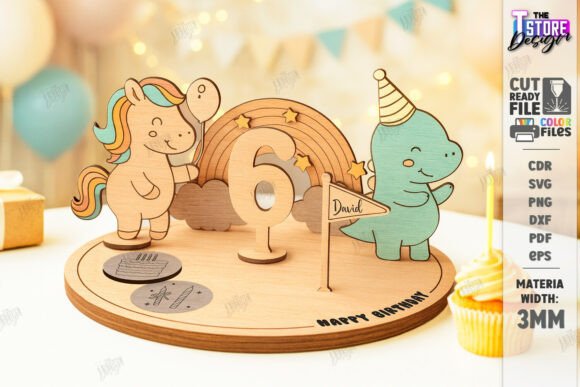
Planning a memorable kids' birthday party involves countless details, and sometimes the most magical moments come from personalized, handmade touches. Imagine a table centerpiece that isn't just functional but tells a story, with adorable animals framing the celebrant's name and age. This is the creative promise of a Birthday Plate Laser Cut | Animals Design, a digital asset designed to bring charm and customization to your celebration.
This digital download is a versatile design file specifically crafted for laser cutting machines. It provides a complete template for creating a stunning decorative plate or table centerpiece, featuring playful animal motifs perfect for a child's party. The file set is prepared for clarity and ease of use: red lines indicate where your laser should cut, while black lines are for engraving intricate details. This separation ensures a professional finish, allowing you to create beautiful, tactile party accessories with precision.
Creative Applications for Your Laser Cut Design
The true value of this design asset lies in its flexibility. While its primary purpose is to create a physical birthday plate, its applications extend far beyond a single party accessory. The charming animal illustrations and clean vector lines make it a fantastic resource for a range of creative projects, acting as a foundational design element.
- Party Decor & Branding: Use the engraved animal designs as a motif for an entire party theme. The plate becomes the centerpiece, but the same animal characters can be adapted for invitations, banners, and thank-you cards, creating a cohesive and professional-looking event design.
- Digital & Print Design: The high-quality vector files (SVG, EPS, DXF) are perfect for digital use. Incorporate the animal illustrations into social media graphics for the party, design a custom logo for a family blog, or create unique packaging for homemade party favors. The PNG file offers a quick solution for digital mockups.
- Crafting & Merchandise: Beyond the plate, this design can inspire other laser-cut projects like cake toppers, custom gift tags, or even wall art for a child's room. For small business owners, it presents an opportunity to create and sell unique, personalized party accessories as part of a commercial product line.
Tips for Selecting and Using Your Design Files
To ensure the best results from your creative project, a few practical considerations are key. First, always verify compatibility with your laser cutting machine and software. The provided file formats—SVG, EPS, PNG, PDF, and DXF—cover most major design programs, but a quick check prevents any hiccups.
A crucial tip for users of Lightburn software: to avoid any potential dimension distortion, especially with SVG files, it is recommended to use the provided DXF file format for optimal accuracy. This small step ensures the final cut piece matches the intended design perfectly. Additionally, consider the material you plan to cut or engrave. The design's lines are optimized for standard materials like wood or acrylic, but testing on a scrap piece first is always wise.
Finally, think about the overall aesthetic. The animal designs in this template carry a specific, playful mood. Pairing this style with complementary fonts for any text additions (like the birthday child's name) will enhance the final product. A simple, bold sans-serif font often works well for clear readability against the intricate engraved patterns.
Choosing a well-designed digital asset like this one is about more than just a single project; it's about acquiring a tool that sparks creativity. It offers a blend of practicality and charm, providing a solid foundation for designs that feel polished, personal, and professionally executed. Whether you're a parent crafting a one-of-a-kind celebration or a designer looking for unique visual elements, a versatile template like this can elevate your work and delight your audience.